
多通路電子發票整合導入
English version · 雙語架構圖 / Bilingual architecture
本方案供 ERP 合作廠商、營業人財會及設備團隊開會使用。由斯沃特銜接 NetSuite ERP 的 B2B(企業對企業)發票,線上票券及現場 POS(含自動售票機)依各自作業選擇開立方式,再由矽聯科技 e首發票加值中心集中處理財政部傳輸與結果查詢。這是導入參考架構。服務與設備支援範圍、開通時程及介面以正式文件與共同測試結果為準。
雙語架構圖 / Bilingual architecture
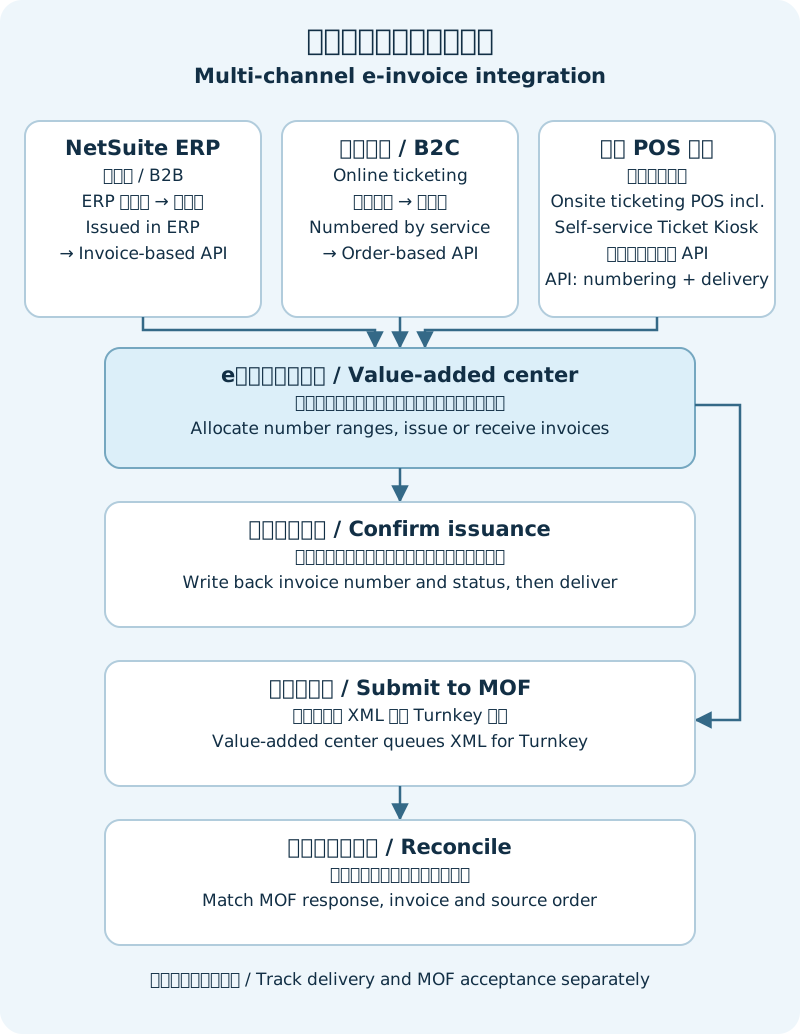
按交易來源選擇 API
| 通路 | 建議作法 | 開會先確認 |
|---|---|---|
| 斯沃特/NetSuite ERP(B2B) | NetSuite 如已依分配號段取號開立,由斯沃特串接標準發票版 API,送入既有發票。 | 由誰取號、何時開立、需存證或另需 B2B 交換。 |
| 官網與第三方線上票券(B2C,企業對消費者) | 優先評估標準訂單版 API,由 e首發票取號開立並回傳結果。 | 誰是開立營業人、原單識別與開立時點。若第三方已自行取號,確認可用號段及回傳資料後走既有發票存檔。 |
| 現場 POS 售票(含自動售票機) | 由服務取號可選標準訂單版。需要回傳設備列印資料或捐贈/歸戶入口,再評估 POS/自助設備 API。已用預配號段自行開立時走標準發票版存檔。 | 網路中斷時是否須繼續開立、由誰送印,以及如何交付載具或證明聯。 |
每筆交易只選一條開立路徑。請先讀 API 選用指南及開立與存檔端點。標準 API 與設備 API 的認證、回應及查詢方式須各自確認。正式欄位與行為以開通時交付的 Swagger/OpenAPI(API 契約文件)為準。
從配號到上傳與對帳
- 先配字軌與號段。 營業人完成字軌申請與加值中心授權後,按開立營業人、期別、通路及實際取號方配置互不重疊的號段。「切本」指把可用的發票號碼劃成不同區段。定期核對剩餘量、已用號與未使用號,換期前完成舊期結清及新期切換。若現場 POS(含自動售票機)需離線開立,須驗證各設備的號段、本機保存、斷線後補送與對帳。
- 保留原單並回寫結果。 來源系統保留營業人、來源通路、原單號、開立時間及發票狀態。發票版由來源系統在取號開立時保存原發票號;訂單版於確認開立後將回傳的發票號寫回原單,並依約定同步 NetSuite 或其他帳務系統。實際交易鍵及回傳欄位依開通契約與測試確認。
- 遇到錯誤先判斷是否開立。 明確的資料錯誤依錯誤原因補正。逾時或結果不明時,以原識別資料核對結果;若已開立,回寫原號。確認可重送後沿用原識別資料,並測試該版本的重送回應。設備 API 的核對入口須先與技術窗口約定。退票、退款所需的作廢或折讓應連回原發票。
- 分開追蹤開立、交付、存證。 e首發票依開通方案轉成 XML,透過 Turnkey(財政部電子發票傳輸機制)傳輸,接收回覆並更新上傳狀態。API 接收、完成開立、列印/載具交付及財政部存證各自有結果。請以後台或已開通的查詢介面核對。財會依需要取得媒體申報資料並核對帳務。
- 將排程與法定時限分開管理。 會議應確認 B2C(C 類)與 B2B(B 類)的轉檔批次、晚到資料、傳輸回覆、逾期告警與補救窗口。請以開通方案確認服務排程與歷史存查範圍,並依財政部賦稅署的存證時限說明確認適用的法定期限。
消費者如何取得發票?
現場 POS(含自動售票機)按消費者選擇、適用規定及設備配置安排手機條碼、會員載具、捐贈或紙本證明聯。設備自行送印與指定印表機雲端送印有不同責任。缺紙、卡紙或離線時,先查原發票及列印結果,再依證明聯列印與補印說明處理。
若第三方票券平台未提供 Email 或手機,且不具備現場列印條件,可評估開通會員載具與訂單查詢。先確認開立營業人及平台提供識別資料的權限,再以平台來源、可用會員識別與訂單號關聯,讓消費者依約定方式驗證後查詢。無可用的會員識別時,應先與營業人確認可行的交付方式。
尖峰量與維運分工
線上訂單如需吸收活動尖峰,前端可先保存交易,再以 Queue(待處理佇列)控速,配合開通的批次介面逐筆核對結果。重試須有上限,待人工處理的交易需能追溯。對現場 POS(含自動售票機)要先確認即時交付需求,再決定是否可將存檔傳輸分散至背景。用實際尖峰量測試接收、開立、回寫與補送;持續高量時再評估專用資源。
- 營業人/財會確認各通路開立責任、時點、稅別、字軌及退票異動規則,負責日常對帳、逾期處置與申報。
- 斯沃特/NetSuite 整合團隊管理 ERP 原單、B2B 取號與串接流程,落實發票號與狀態回寫,協助查明帳務差異。
- 票券平台與設備整合商保存交易並處理 API 結果、現場 POS(含自動售票機)的設備列印、載具操作及斷線復原。
- 矽聯科技 e首發票依開通方案提供 API、字軌切本配號、載具與列印服務配置,以及上傳、查詢和媒體申報資料支援。
會議請帶三類去識別化樣本:NetSuite B2B、線上票券、現場 POS(含自動售票機)。會後應留下每通路的取號方、API、回寫欄位、交付方式及異常窗口。完成正常開立、結果不明、重送、設備印表機異常、斷線補送、尖峰與退票異動的測試,並能由原單核對發票與財政部存證結果,再安排切換。
English | Multi-channel e-invoice integration
This reference architecture is for ERP partners, merchant finance teams and device integrators. 斯沃特 coordinates the NetSuite ERP flow for business-to-business (B2B) invoices. Online ticketing and onsite ticketing POS, including the Self-service Ticket Kiosk, use the issuance path that fits each channel. The e首發票 value-added center, operated by SystemLead, handles Ministry of Finance (MOF) transmission and status lookup within the agreed service scope. Confirm activation, equipment support and the applicable API contract before implementation.
View the bilingual architecture diagram.
Choose an API by channel
| Channel | Suggested path | Confirm first |
|---|---|---|
| 斯沃特 / NetSuite ERP (B2B) | If NetSuite has already assigned the number and issued the invoice, submit the existing record through the standard invoice-based API. | Who assigns the number, when issuance happens, and whether B2B exchange is needed in addition to MOF submission. |
| Website and third-party online ticketing (B2C) | Use the standard order-based API as the starting point. e首發票 assigns the number, issues the invoice and returns the result. If a third party has already assigned a number, confirm its range and data handoff before submitting the existing invoice. | Issuing merchant, original order identifier and issuance trigger. |
| Onsite ticketing POS, including the Self-service Ticket Kiosk | Use the standard order-based API for service-side numbering. Consider the POS/device API when the device needs print data or a donation or carrier-linking page. Use the standard invoice-based API to submit records already issued from a preallocated range. | Offline operation, print owner, and delivery by carrier or printed proof. |
Choose one issuance path per transaction. Check the API selection guide and issuance and submission endpoints. Standard and device APIs have separate authentication, responses and lookup procedures. Use the Swagger/OpenAPI contract supplied at activation.
Allocate numbers, write back results and reconcile
- Allocate invoice series and number ranges. After registration and authorization, assign non-overlapping ranges by issuing merchant, invoice period, channel and numbering owner. Reconcile used and unused numbers and plan each period rollover. If onsite POS, including the Self-service Ticket Kiosk, must issue offline, validate device-level ranges, local records, recovery submission and reconciliation.
- Keep the original order and record the result. Retain the merchant, channel, source order ID, issuance time and invoice status. With the invoice-based API, the source retains the number at issuance. With the order-based API, write the returned invoice number to the original order after confirming issuance, then synchronize it to NetSuite or the relevant accounting system as agreed. Validate the matching keys and response fields against the enabled contract.
- Resolve ambiguous outcomes before retrying. Correct confirmed data errors. After a timeout, check the original transaction first. If an invoice exists, record its existing number. Retry with the same identifiers only after confirming that the operation can be retried, and test how the enabled API version responds to duplicate submissions. Agree on a lookup route for the device API. Link ticket refunds that require a void or allowance to the original invoice.
- Track issuance, delivery and MOF acceptance separately. Under the enabled service, e首發票 converts invoice records to XML, transmits them via Turnkey and updates upload status when MOF responds. Track request receipt, invoice issuance, print or carrier delivery, and MOF acceptance separately. Reconcile using the portal or the applicable status API. Finance obtains and checks the media filing data as needed.
- Confirm operational schedules and legal deadlines separately. Agree on the B2C and B2B conversion batches, late arrivals, MOF responses, alerts and escalation owners. Confirm the service schedule and historical lookup options at activation. Consult the MOF guidance on submission deadlines for the applicable legal deadlines.
Deliver the invoice to the customer
For onsite POS, including the Self-service Ticket Kiosk, confirm which options the device and service support: mobile barcode, member carrier, donation or printed invoice proof. A member carrier is an electronic identifier used to store invoice records. Device-controlled printing and cloud printing have different owners. For paper jams, out-of-paper events or offline devices, check the existing invoice and print status before following the printing and recovery guide.
When a third-party ticketing platform provides neither email nor phone and printing is unavailable, consider an enabled member carrier and order lookup service. Confirm the issuing merchant and permitted access to platform identifiers. Link the platform, authorized member identifier and order number so the consumer can complete the agreed verification and retrieve the invoice. If no suitable member identifier is available, agree on another delivery method before launch.
Manage peak traffic and agree ownership
For online peaks, persist orders first and use a queue to regulate submissions. If batching is enabled, reconcile the result of each item. Limit retries and preserve a record for manual handling. Confirm immediate delivery requirements for onsite POS, including the Self-service Ticket Kiosk, before moving submission of already-issued invoices to background processing. Load-test receipt, issuance, write-back and recovery before deciding whether sustained volume requires dedicated resources.
- Merchant and finance own the issuing merchant decision, issuance triggers, tax treatment, invoice series, refund rules, reconciliation, late-case resolution and filing.
- 斯沃特 and the NetSuite integration team own ERP source records, the B2B numbering and integration flow, invoice write-back and ERP discrepancy investigation.
- Ticketing and device integrators retain transactions, process API results and own device printing, carrier interactions and offline recovery for onsite POS, including the Self-service Ticket Kiosk.
- SystemLead / e首發票 supplies enabled APIs, number range allocation, carrier and printing configuration, MOF transmission, status lookup and media filing data within the agreed scope.
Bring de-identified samples for NetSuite B2B, online ticketing and onsite POS, including the Self-service Ticket Kiosk. Leave the meeting with an owner for numbering, API selection, write-back, delivery and escalation for each channel. Test normal issuance, ambiguous responses, retries, print failure, offline recovery, peak load and ticket refunds. Schedule the cutover after source orders reconcile with invoices and MOF acceptance results.